Master Resume
One resume that every other tool reads from.
Everything in ResumeFox hangs off one document. Write your history once, properly, and the targeted versions, the cover letters, the interview prep and the fit assessments all read from it, so improving the master resume improves every application you send afterwards.
You do not start from a blank page. Upload the resume you already have and we read it, ask where you are headed next and a few short questions about what it does not tell us, and rewrite it section by section.
How it works
- 1
Upload what you have
A PDF or a Word (.docx) file. We start reading the moment you pick the file rather than after a form: most of the wait is already over by the time you have answered anything.
- 2
Answer a few questions
First, what kind of role you are going for next, so the rewrite aims there rather than at the job you already have. Then up to three about what the page leaves out. A resume is a lossy record: it rarely says how big the team was, what the budget ran to, or what actually happened as a result. This is the part that makes the rewrite worth having.
- 3
Read the rebuilt version
Rewritten section by section: a real professional summary, achievement-led bullets rather than duty lists, and consistent formatting. Then choose the template, color and text size that suit it.
- 4
Edit anything, then keep it
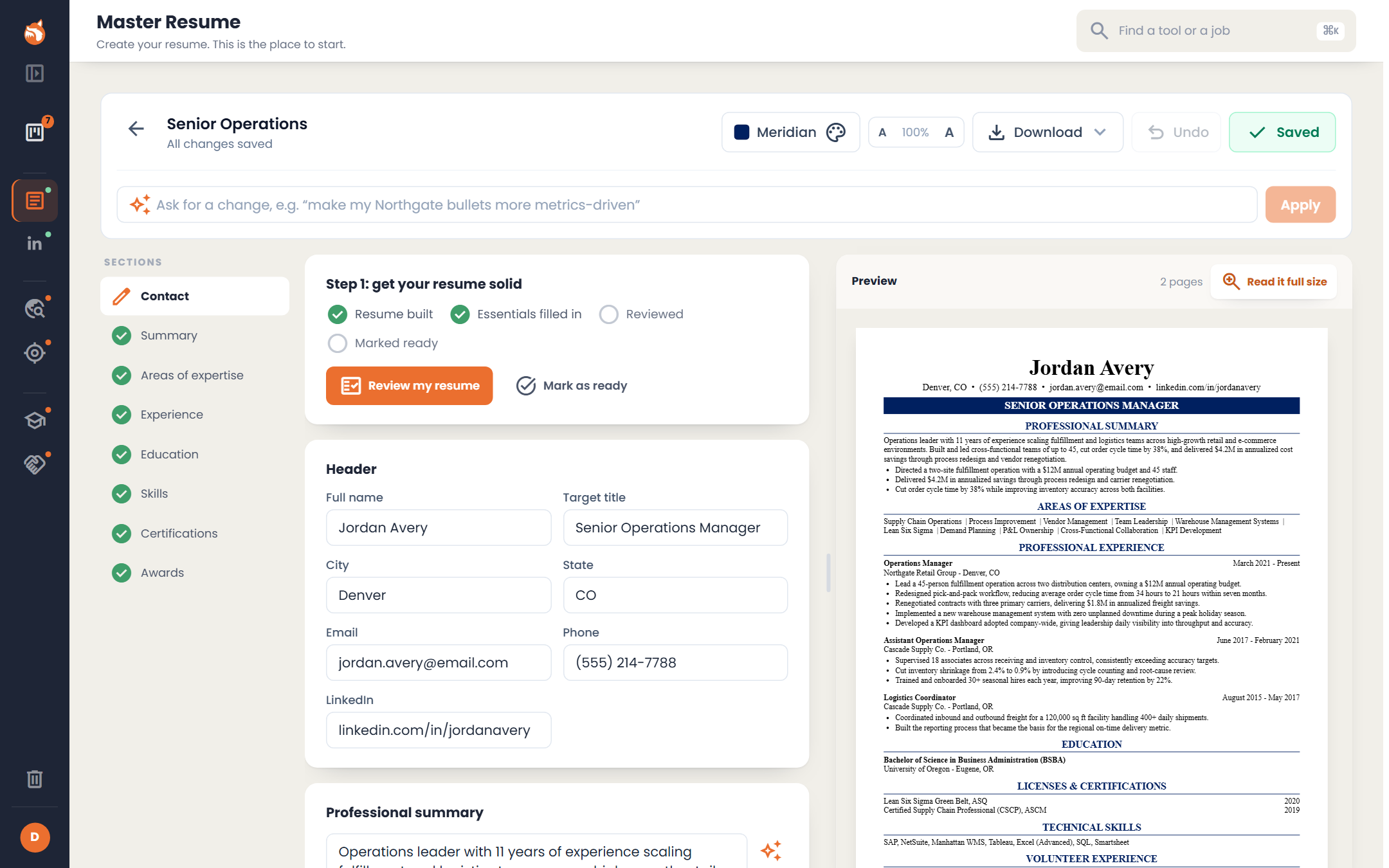
The editor puts your content beside a live page preview, so you see the document change as you type. Drag the divider to give the preview more room, or open it full size to read it as it prints. Undo works. Switch template, accent color and font size without touching a word.
What you get
- check_circleReads PDF and Word (.docx) files.
- check_circleRewrites weak duty-list bullets into achievement statements, using numbers you actually gave us.
- check_circleFull editor with undo, and a live page preview you can widen, open full size, and read with a guide marking where page two starts.
- check_circleAll eleven templates, any accent color, and font-size control, without changing your content.
- check_circleA Federal template, with a supplement for the details a federal application asks for, entered by you, never written by the AI.
- check_circleDownload it as Word, PDF or plain text.
- check_circleWith Full Access, describe a change in a sentence and the AI makes just that change.
- check_circleBuild from scratch instead if you have no resume yet: you pick a template first, then describe your work in plain words and we write the bullets.
What this tool won't do
These are constraints we chose, not gaps we haven't got to.
Every metric, employer, date and credential comes from what you told us. Where there is no number to use, the accomplishment is written without one.
Your full employment history stays on the resume. Tailoring later can reorder and reword freely, and tells you about anything it removes and why.